UK Smartware User Group Meeting, August 5th
1999
BALDHEAD GUI
The Baldhead GUI layer is a major leap forward in
the fight to make ANGOSS Smartware look more like a Windows application.
This battle is being won due to the innovation and commitment of Smartware
users like yourselves, but on this occasion Jason COULLS delivers the
goods.
We all know that Smartware 2000 is a true 32-bit application that can
outperform many dedicated Windows applications. However on the other side
we have the dedicated Windows users that make life more complicated by
insisting on applications with a Windows 'front end' regardless of performance
issues. These users form the majority of customers for Smartware developers
and look no further than the way an application is presented, i.e. if
it isn't Windows it can't be any good!
The first person (to my knowledge) to tackle this perceived shortcoming
was Rocky SCHOFIELD with Smart Designs, a graphical front end written
entirely in SPL which is some achievement in it's own right. At last Smartware
applications could now look similar to Windows based software in many
ways. However you could still tell this was not a true Windows based GUI.
Earlier this year at the SMUG meeting SWAPI II, developed by Jason COULLS
of Baldhead systems, was demonstrated and started to pave the way forward
towards a more windows integrated system. SWAPI II was a major leap forward
allowing direct access to the Windows API (Application Programming Interface).
SWAPI Pro is currently in development so expect more of the same. Jason,
not being one to rest on his laurels has taken the Windows integration
even further and I think he has a winning product, the Baldhead GUI (Graphical
User Interface). I have no doubt that market forces will push Smartware
to the limit over the next few years, and without a tool like this I can
foresee many 'DOS' applications written in Smartware being dropped in
favour of more Windows oriented tools like Microsoft Office. With the
Baldhead GUI you can take your existing Smartware system and hide it behind
some visual basic code and forms, and hey presto - a working Windows product
that looks no different to any of Bill Gates products - except that is
that it's performance is better.
The Baldhead GUI Layer is an impressive development because now you can
create a front end using 'proper' Visual Tools, such as Microsoft Visual
BASIC. These tools are designed specifically for Windows to create 'total'
windows look and feel front ends capable of directly controlling an underlying
Smartware system. The end user doesn't even have to see the Smartware
system at any point, although it is there beavering away in the background
doing the donkey work in it's ever efficient manner.
How does it work, well magic of course!, not really. The system consists
of a couple of components, namely some cunning visual basic function libraries
and a 'C' library. The components work together to pass messages between
the 'frames' in the Windows environment, enabling a Smartware system in
the background to intercept these messages, act on them and pass results
back (such as Smartware error messages). All of this sounds very technical,
and it is, just take a look at the 'Baldhead Newsletters' which are available
on the 'technical' page of the User Group web site.
Thankfully all the hard work has been taken out of the equation with the
GUI Layer and DLL doing all the conversion between data formats. As a
result anyone who is a little competent with Visual BASIC can in a very
short time develop systems that work around your Smartware applications.
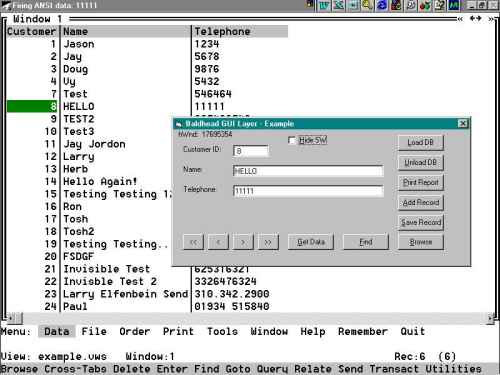
Now you see it. The first example below shows a Visual Basic program controlling
a simple Smartware based telephone pad application, the demonstration
application that Jason provides with the demo system. The controls in
the VB program provide all the navigation and editing facilities, whilst
Smartware does the work behind.
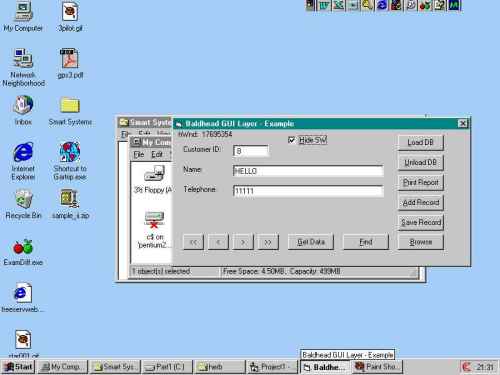
Now you don't. One simple click in the 'Hide SW' check box and the underlying
Smartware system, although still running is hidden from the end user,
it doesn't even appear in the task bar. Users would not be aware of the
fact that they were using Smartware, but still have the benefit of its
better performance. This approach could be used to provide many facilities
that ODBC provides, thereby eliminating the need for ODBC for many applications
and it's currently associated shortcomings.
You are by now realising the potential of this type of approach to provide
a Windows front end to Smartware applications for those demanding end
users, whilst still retaining the portability and cross platform support
of ANGOSS Smartware 'behind' for other users. Just to give you an example
of how easy it is to program Smartware using the Baldhead GUI, here is
a code snippet from the 'Add Record' button of the Visual Basic form.
Private Sub cmdAddRecord_Click()+
'Throw this event to the SmartWare Object.
Smart.RunSPL "DATA ENTER LOCK"
Me.txtCustomerID = ""
Me.txtName = ""
Me.txtTelephone = ""
MsgBox "Fill in data, then click the SAVE RECORD button!", vbInformation,
AppName
End Sub
A click of this button tells Smartware to create a new record and lock
it ready for input. The three text boxes, txtCustomerID etc., are then
blanked ready for the user to enter data. An information box is displayed
informing the user what to do next. When the user clicks in the appropriate
text boxes and enters data the form is filled. A click of the 'Save Record'
button then adds the form contents to the Smartware data file, as the
below 'Save Record' button code shows;
Private Sub cmdSaveRecord_Click()
'Save the data back...
'Smart.RunSPL "[Customer] = " & Me.txtCustomerID.Text
Smart.RunSPL "[Name] = " & Chr(34) & Me.txtName.Text & Chr(34)
Smart.RunSPL "[Telephone] = " & Chr(34) & Me.txtTelephone.Text
& Chr(34)
Smart.RunSPL "WRITE-RECORD"
Smart.RunSPL "REPAINT"
'Update the display...
SynchData
End Sub
Public Sub SynchData()
'This synchronises the text boxes on screen.
frmMain.txtCustomerID.Text = Str(Smart.RequestFieldData("[CustomerID]"))
frmMain.txtName = Smart.RequestFieldData("[Name]")
frmMain.txtTelephone = Smart.RequestFieldData("[Telephone]")
End Sub
CREATING FORMS
One thing that has now crossed your mind I would guess is the work involved
in converting custom and standard views to forms. Chris Anderson wrote
a utility to do the work for Smart Designs, and unusually Microsoft has
done the work for us (sort of). In the professional edition of Visual
BASIC 6 is a data manage tool. Amongst the tools for this 'applet' is
the ability to link to a database using ODBC, which means we can get to
Smartware. Using this link enables us to then take the structure of the
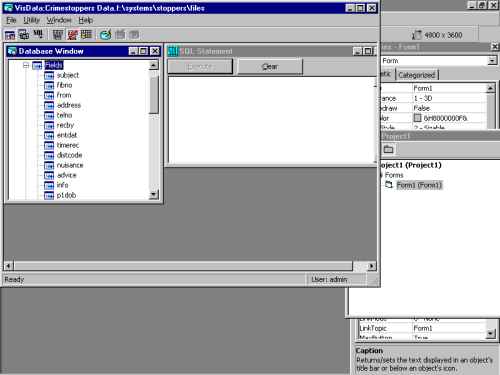
Smartware data file and build a new form. The below screenshot shows a
link to our crimestoppers system and the fields are exposed for manipulation
via the ANGOSS ODBC driver.
One click on the utility/build form option and we are able to choose the
fields required on our new VB form.
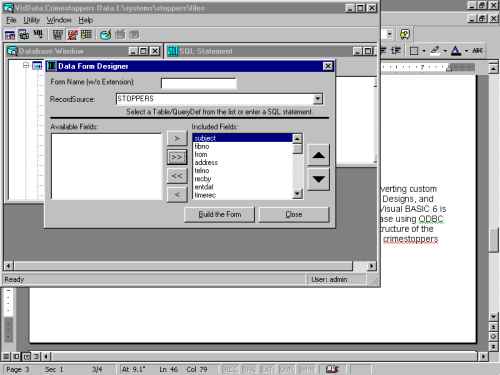
I have chosen to select all fields in the example above. Clicking on 'Build
the form' will then create the new visual BASIC form and automatically
link it to the Smartware database using ODBC. This is not our requirement
so the form can be saved as a separate component and the properties and
code changed to reflect our needs and the use of the Baldhead GUI instead.
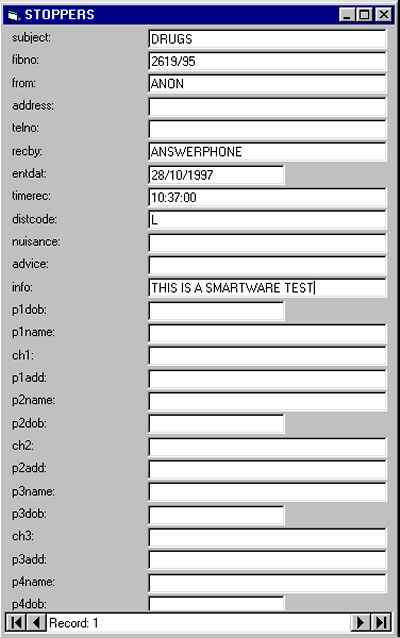
Below is what our basic form looks like (under ODBC mode) after it is
finished. The Baldhead GUI version would look the same but would be different
'under the bonnet'.
That takes care of how to create the forms. The last thing to look at is a brief description of the available visual basic commands to work with Smartware and what they do.
The GUI Layer Functions and Methods
Only use the methods listed in this table. The subclassing system or the SmartWare application will internally use the other functions.
The following table lists the functions, methods and examples of usage:
| Function/Method/Property Name | Description | Example |
| AdoptSmartWare | Tells SmartWare which Window is to receive errors. | Smart.AdoptSmartWare Me.hWnd |
| CloseAngoss | Signals SmartWare to unload all active files and close itself. | Smart.CloseAngoss |
| HideSmartWare | Debug Function: Hides the SmartWare Window. | Smart.HideSmartWare |
| PRECORD | Returns the Physical Record that the active database is sitting on. The Subclass.bas file sets this, so do not set it manually. | X = Smart.PRECORD |
| PRECORDS | Returns the total number of Physical Record that the active database contains. The Subclass.bas file sets this, so do not set it manually. | X = Smart.PRECORDS |
| RECORD | Returns the record position you are sitting on in a subset of database records. The Subclass.bas file sets this, so do not set it manually. | X = Smart.RECORD |
| RECORDS | Returns the total number of records in a subset of database records. The Subclass.bas file sets this, so do not set it manually. | X = Smart.RECORDS |
| RequestFieldData | Returns the data held in the fieldname specified. Note: The fieldname must be within square brackets. | X=Smart.RequestFieldData "[Name]" |
| RunSPL | Allows you to run SmartWare Programming Language (SPL) code from within your VB app. | Smart.RunSPL "Data Goto Record Next" Smart.RunSPL "File Unload All" Smart.RunSPL "Data Query Execute,etc" |
| SetControllingWindow | Sets an internal variable holding the Window handle of the VB form in charge of data copying operations. | Smart.SetControllingWindow Me.hWnd |
| ShowSmartWare | Debug Function: This shows the SmartWare window. | Smart.ShowSmartWare |
Jason has really accomplished what many people thought was impossible.
When this product becomes available it will be the only tool required
in your Smartware toolbox apart from your fully licensed copy of Smartware
that is. Come along to the UK Developers conference to see the latest
system in action, a preliminary scaled down demonstration will be shown
at the August UK Smartware User Group meeting.
At the time of writing this article the GUI system is not finished. A
soon as it is then I will post the details on the web site. Jason has
been kind enough to let me give you a sneak preview but he is an extremely
person. Should you have any questions then I would ask that for the time
being you direct them through me to ensure that we do not duplicate questions
and Jason is given the maximum of time to himself to do what he can to
complete the project. Thank you for your co-operation and I hope I have
given you a taste of Smartware's future.